MIM Sets And MPRs In SailPoint: Populations, Roles, And Workflows Explained
Every Microsoft Identity Manager (MIM) estate is built on two constructs: sets and management policy rules (MPRs). When
Press Release Disclaimer: This is a press release distributed through the XPR Media network. It has not been independently verified by our newsroom.

Every Microsoft Identity Manager (MIM) estate is built on two constructs: sets and management policy rules (MPRs). When an organization plans a move to SailPoint IdentityIQ, the first design question is how those constructs map to SailPoint’s roles and policies. Azure IAM, LLC, an independent identity consulting firm that migrates MIM estates to IdentityIQ, says the mapping is not one construct to one construct. MIM uses sets and MPRs for at least four different jobs, and IdentityIQ gives each job its own object. The full method is documented at https://azureiam.com/mim-to-sailpoint.
Why MIM and IdentityIQ disagree
In MIM, a set is a population defined by an XPath filter, such as all active employees in the finance department. MPRs give sets meaning. A set transition MPR fires an action workflow when an object enters or leaves a set. A request MPR grants a set of requestors permission to create, read, modify, or delete attributes on a set of targets, optionally gated by authorization workflows. Group membership is often driven by the same set criteria.
IdentityIQ splits that work across separate objects: populations for “who”, lifecycle events and workflows for “what happens when”, roles for “what access”, and capabilities and scopes for “who may change what”. The migration question is therefore not “what does a set become” but “what is this particular set doing”.
Job one: sets that define a population
The cleanest translation is the set itself. Azure IAM translates each set’s XPath filter into an IdentityIQ filter and emits it as a population, stored as a GroupDefinition object. The original XPath is kept in the population’s description, so an auditor or engineer can trace any IdentityIQ population back to the MIM set it came from.
Two patterns are refused rather than guessed. Sets whose XPath needs a subquery, and sets that compare MIM object identifiers, have no faithful IdentityIQ filter equivalent. Azure IAM lists them in the migration caveats so each is rebuilt deliberately, for example as a rule backed population or an attribute that carries the relationship explicitly.
Job two: set transition MPRs that drive lifecycle
Set transition MPRs are where MIM implements joiner, mover, and leaver processing. A mature estate commonly spreads one lifecycle event across several MPR and workflow pairs: one rule to create the account, another to set the mailbox, another to notify the manager.
IdentityIQ expects one workflow per lifecycle event. Azure IAM’s approach classifies each MPR and workflow pair as joiner, mover, leaver, or unclassified, records the evidence behind the classification, and puts every pair in front of a human to confirm or correct. Confirmed pairs for one event merge into a single consolidated workflow. The leaver workflow gets the most care: its trigger matches a transition rather than a state, so a move from inactive to terminated does not rerun deprovisioning against an account that is already disabled.
Timing also changes. A MIM set transition fires when the request that changes membership is processed. An IdentityIQ lifecycle event fires when an identity refresh notices the change. Any process that needs near real time behavior, such as same day disablement at termination, should be identified during scoping so the refresh schedule is designed around it.
Job three: groups that become roles
Most MIM estates manage Active Directory groups, and group membership is usually the product of set criteria and policy. What MIM lacks is a layer that explains why the access exists. That gap is where IdentityIQ roles add value instead of simply reproducing the old model.
When group reporting is supplied, Azure IAM produces a two tier role model:
IT roles hold the entitlement, one IT role per Active Directory group, carrying the group membership on the target application.
Business roles carry the business meaning, such as Finance Analyst or Help Desk Tier 1, and confer the IT roles beneath them.
Business roles are what managers and certification campaigns see. That layer is what later supports access requests, access certifications, and role mining. A conversion report lists one row per group, so every group has a recorded outcome. Security groups, distribution groups, and criteria based groups are all included in the role conversion.
Job four: request MPRs that grant permissions
Request MPRs are the construct teams most often forget to plan for. A rule that allows the help desk to update phone numbers, or lets managers edit their direct reports, is an authorization rule, not a role and not a lifecycle event.
Azure IAM inventories every request MPR with its requestor set, target set, permitted attributes, and any authorization workflow, then maps each intent to the IdentityIQ construct that preserves the control, typically capabilities, scopes, lifecycle manager configuration, or an approval in the lifecycle request workflow. These are presented as decisions for the client’s team rather than silent conversions, because the right answer depends on how the organization wants delegated administration to work after cutover.
What the policy deliverable contains
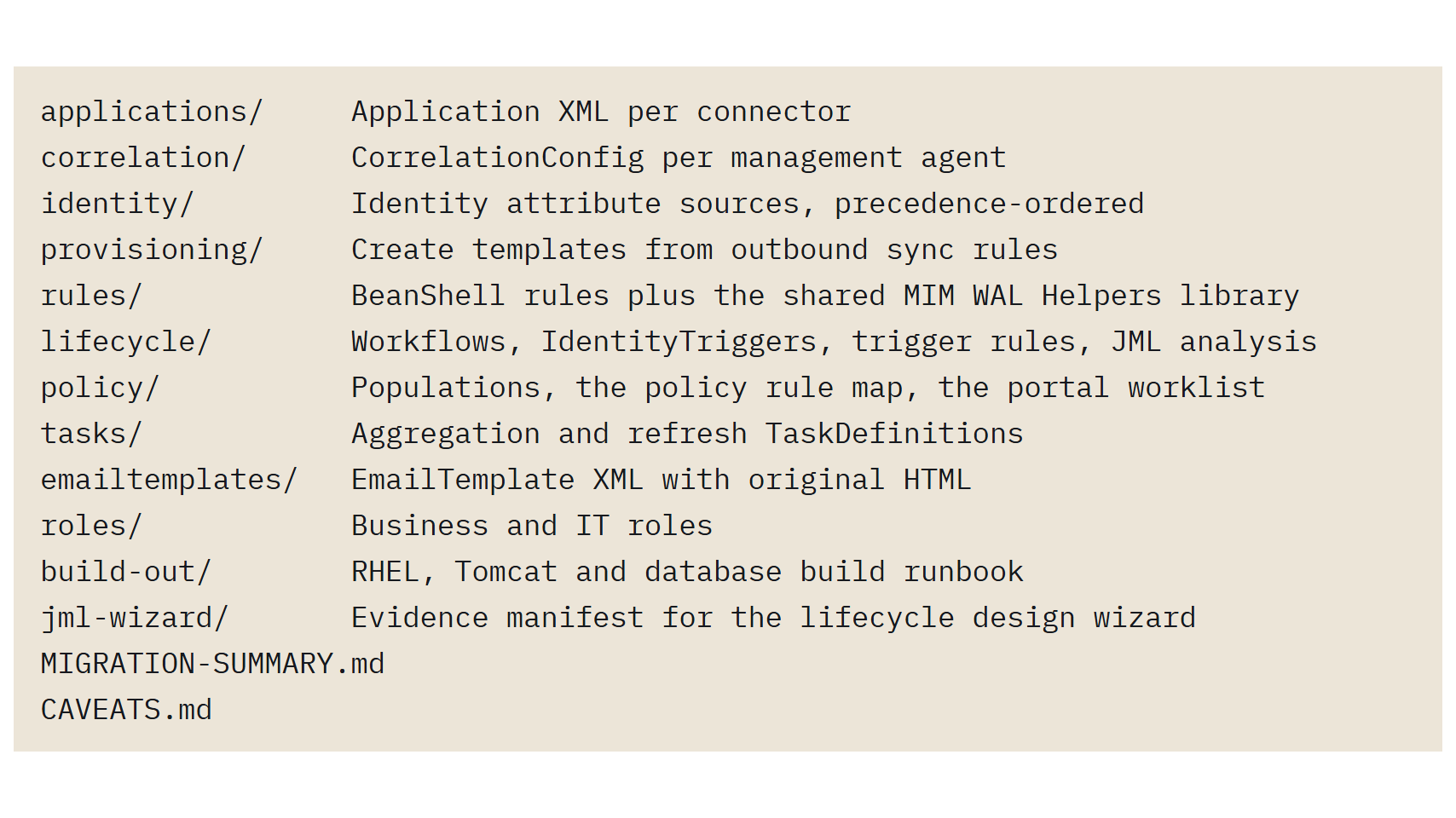
Each connected system becomes a provisioning plan rule called from the lifecycle workflow. The policy folder in the deliverable holds the populations, the policy rule map that ties each MIM MPR to its IdentityIQ destination, and the portal worklist for items that need a decision. The full package also includes application XML, correlation configuration, identity attribute sources, provisioning templates, BeanShell rules with a shared helper library, tasks, email templates, roles, a build out runbook, and a migration caveats file.
How correctness is established
Azure IAM validates the mapping by running MIM and IdentityIQ in parallel. During that run MIM remains the only system provisioning to downstream systems. IdentityIQ aggregates, evaluates its populations and roles, and computes the provisioning it would send, but nothing reaches connected systems. The comparison covers Active Directory group membership and outbound provisioning and continues until the results match, so any set, role, or policy that behaves differently is found before cutover rather than after it.
Deadlines that shape the timeline
Microsoft’s extended support for MIM 2016 SP2 runs through January 10, 2029, which leaves time for a planned migration rather than an emergency one. Organizations that host the MIM Portal on SharePoint Server 2019 face an earlier constraint, because SharePoint Server 2019 reached end of support on July 14, 2026.
Next step
Organizations still running MIM sets and MPRs can book a scoping call with Azure IAM at https://azureiam.com/contact. The call reviews which sets become populations, which groups become IT and business roles, and which policy rules need a decision, and it leads to a fixed fee migration quote that covers what the MIM estate does today.
Azure IAM, LLC
2521 North Main
Unit 1-276
Las Cruces
New Mexico
88001
United States